Query your data warehouse from Claude or ChatGPT via MCP
June 26, 2026
- min read
Harbinder Singh
Chief Technology Officer
TLDR
From August 2026, Kleene.ai connects to Claude, ChatGPT, Cursor, and any MCP-compatible AI client. Ask questions about your data, generate SQL transforms, debug pipelines, write to sandbox, all without leaving the conversation.
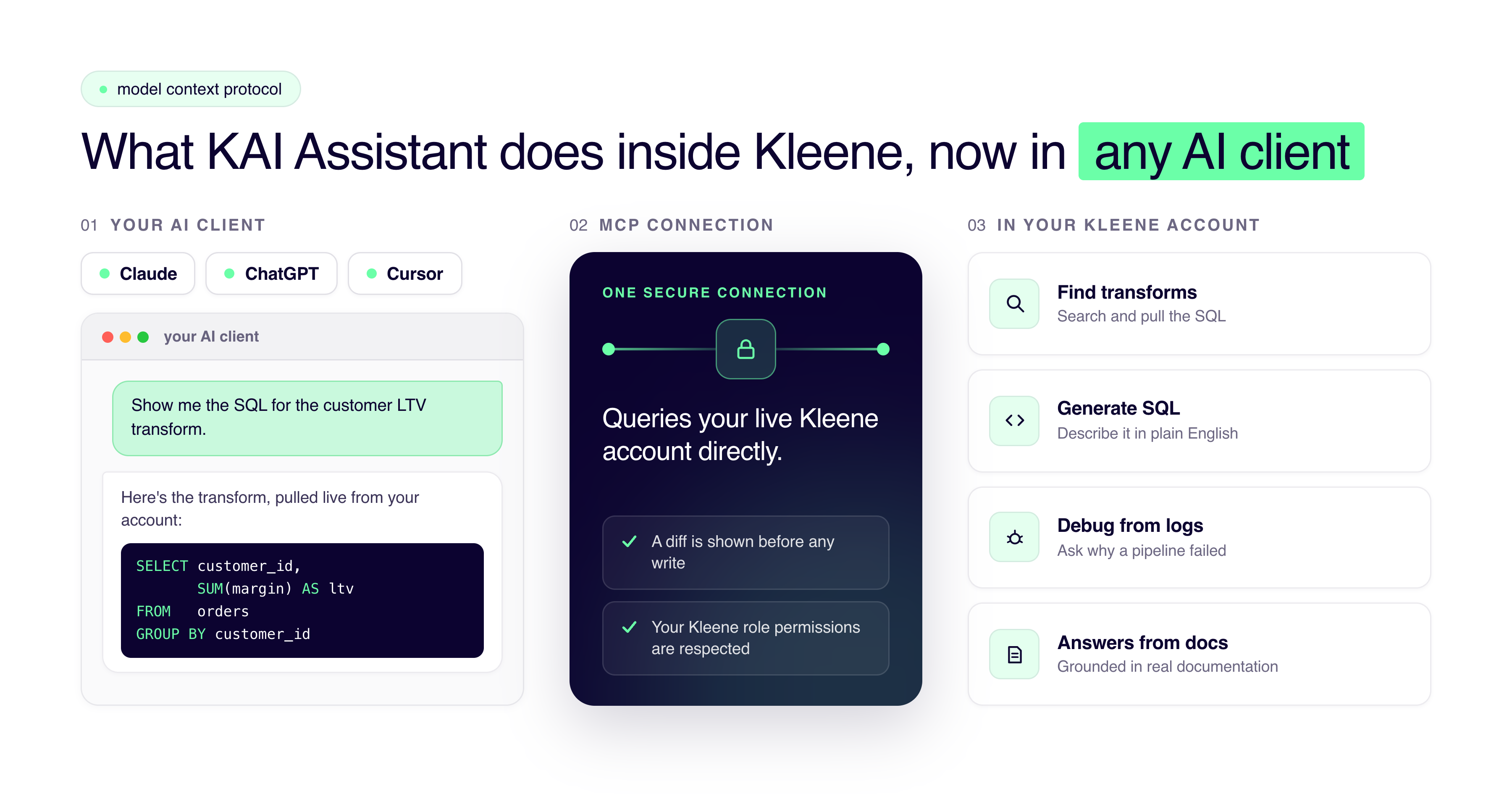
What KAI Assistant already does, now in any AI client
If you prefer working in Claude, Cursor, or ChatGPT, you don't need to change tools. Just connect your Kleene.ai account and ask your Kleene.ai related questions there. KAI Assistant has been doing this inside Kleene.ai for a while. The MCP integration is that same capability, accessed through whatever AI client your team already uses.
Here's what's available today.
How the Kleene.ai MCP works, letting you query directly from Claude, ChatGPT, or Cursor
Finding and inspecting transforms
Search transforms and groups by name, pull the SQL for a specific transform, check when it last ran, retrieve the latest version.
"Show me the SQL for the customer LTV transform."
"Find all transforms in the marketing pipeline group."
"When did the weekly revenue summary last run successfully?"
Generating and optimizing SQL
Describe what you need in plain English. The MCP generates SQL and shows you a diff before anything is written. You choose whether to insert it into the editor or send it to sandbox for testing. Nothing is committed without your review, and write access respects your existing role permissions in Kleene.
"Write a transform that calculates 30-day rolling revenue by customer."
"Rewrite this join to reduce query cost."
"Build a weekly cohort retention transform and put it in sandbox."
Debugging without digging through logs
Describe what's broken or isn't working as intended. The MCP then searches logs for the relevant transform, surfaces recent errors, and explains what's going wrong.
"Why did the orders pipeline fail last night?"
"What does this error mean and how do I fix it?"
"Show me errors from the last run of the revenue transform."
Before, this meant opening logs, finding the right transform, reading through raw output. Most people just messaged someone on Slack instead.
Browsing schemas and previewing tables
Check what columns a table has, what the data looks like, what relationships exist, without navigating out of your LLM and into the schema browser.
"What columns are on the orders table?"
"Show me a sample of the sessions data."
"What tables are in the ecommerce schema?"
By default, previews use synthetic samples with PII, passwords, and payment data removed before anything reaches the AI. Raw previews are available if you enable them inside App Settings.
Getting answers from the Kleene docs
"How does pipeline scheduling work?"
"What's the recommended pattern for incremental transforms?"
"How do I set up an Asana source connector?"
Answers come grounded in the actual Kleene.ai documentation. Useful if you're onboarding someone, or if you just can't remember how incremental scheduling works for the fourth time.
You'll need an active Kleene.ai account with MCP enabled in App Settings (Settings > AI tab).
What's coming
The MCP currently covers what KAI Phase 1 does: transform intelligence, SQL generation, log search, schema browsing, documentation search.
Phase 2 adds full ELT pipeline creation through conversation. Phase 3 brings analytics model context, KAI Orchestration models like segmentation, forecasting, price elasticity, all queryable directly from your AI client without additional visualization.
If you want to try it now, start with something you already know. Ask for the SQL on a transform you've worked with before, or pull the schema for a table you use regularly.
MCP FAQs
What MCP is
MCP (Model Context Protocol) is an open standard that lets AI assistants connect to external tools securely. Instead of copying data between tabs, your AI client queries your Kleene.ai account directly inside the conversation, your real transforms, your actual schema, your pipeline logs.
For data teams: your AI client can now search transforms, generate SQL, debug errors, preview table schemas, and write to sandbox using your live data. Not hypothetical examples. Your stuff.
Which AI clients can I use?
Claude, ChatGPT, and Cursor at launch, plus any client that supports the Model Context Protocol. MCP is an open standard, so as more tools adopt it, they'll work with Kleene.ai without anything changing on your end. You connect once in App Settings and then use whichever client your team already prefers.
Does my data leave Kleene.ai and go into the AI model?
By default, table previews use synthetic samples, with PII, passwords, and payment data stripped out before anything reaches the AI client. So when you preview the orders table, the AI sees the shape and structure of your data, not your customers' actual details. If you have a reason to work with raw previews, you can enable them in App Settings, but it's off until you turn it on.
Can the AI change something in production without me knowing?
No. When you ask the MCP to write or rewrite SQL, it shows you a diff first, and nothing is committed until you choose to insert it into the editor or send it to sandbox. You're always the one who decides whether a change goes anywhere. There's no path where the AI quietly edits a live transform on its own.
Does it respect our existing permissions?
Yes. Write access through the MCP follows the same role permissions you've already set in Kleene.ai. If someone can't edit a given transform inside the platform, connecting through Claude or ChatGPT doesn't change that. The AI client is another way into your account, not a way around its controls.
Do I need to be technical to use it?
It depends what you're doing. Asking questions about your data, browsing schemas, pulling the SQL behind a transform, or checking why a pipeline failed all work in plain English and don't require you to write any code. Generating and editing transforms is more useful if you can read SQL, since you're reviewing a diff before it's saved, but you don't have to write the SQL yourself.
How do I turn it on?
MCP is enabled per account in App Settings, under Settings > AI. You'll need an active Kleene.ai account with MCP switched on there, then you follow the setup guide for your specific client. The full walkthrough for Claude, ChatGPT, Cursor, and other MCP-compatible clients is in the connection guide linked above.
What can't it do yet?
Today the MCP covers what KAI Assistant Phase 1 does: finding and inspecting transforms, generating SQL, searching logs, browsing schemas, and answering questions from the Kleene.ai docs. It can't build full ELT pipelines through conversation yet, and it can't query analytics model outputs like segmentation or forecasting. Those are Phase 2 and Phase 3, both on the roadmap.
Is this different from KAI Assistant inside Kleene.ai?
It's the same capability, reached from a different place. KAI Assistant has worked inside the Kleene.ai platform for a while, and the MCP integration takes that and makes it available through whatever AI client your team already lives in. If you prefer working in the Kleene.ai app, nothing changes. If you'd rather stay in Claude or Cursor, now you can.


%201.svg)


%201.svg)
