Self-service analytics means business users being able to answer their own data questions. If a finance manager wants to know what margin did last month, instead of sending a request to the data team and waiting a few days, they can look it up themselves and trust what comes back. This matters because in most companies the data team's queue is mostly full of questions like that, questions that shouldn’t be taking up an analyst’s time.
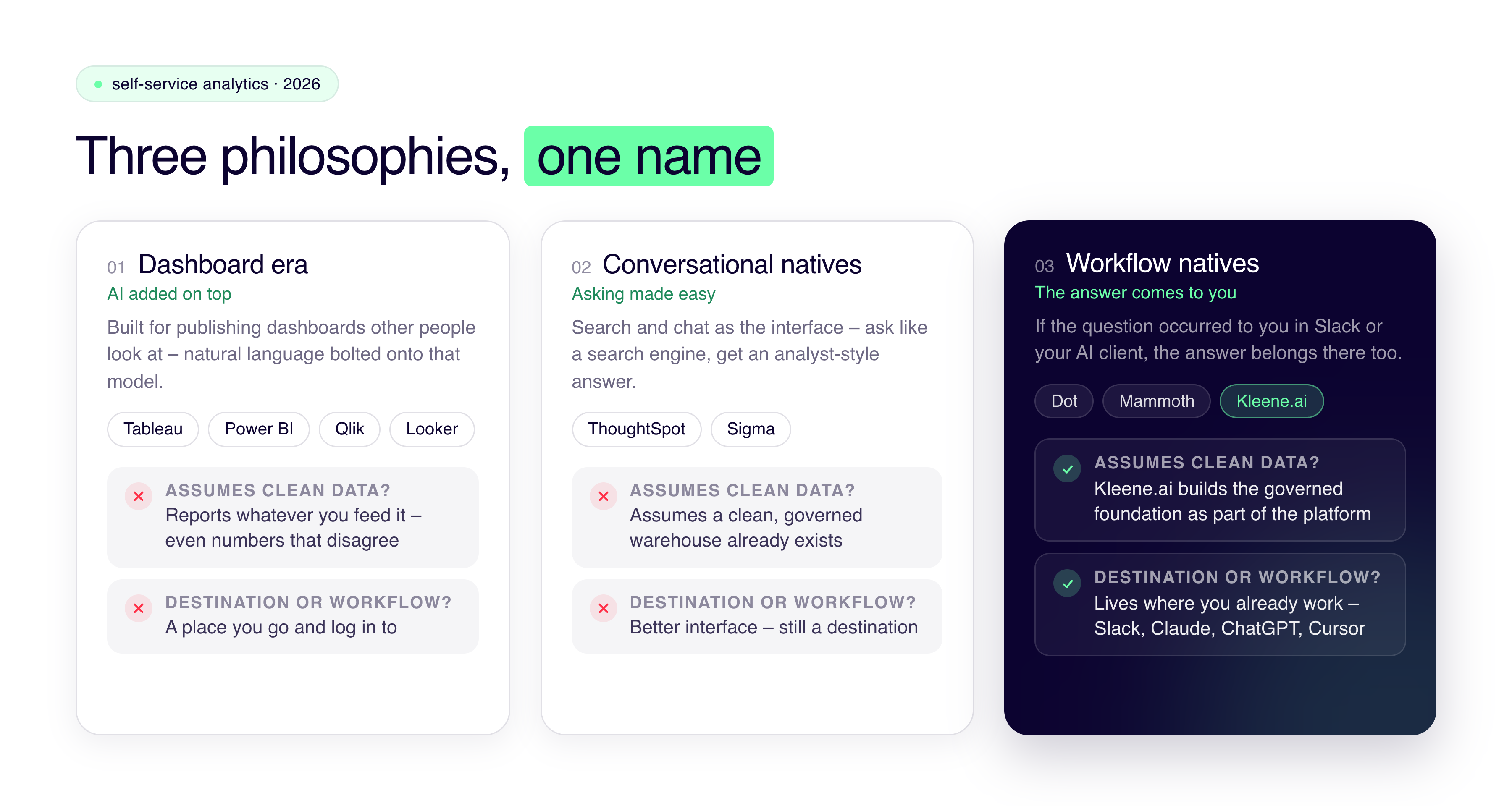
If you've bought one of these tools before, you'll know they often over promise and under deliver. In 2026 there are three different philosophies competing under the name ‘self-service analytics’. Rather than ranking a traditional top ten, we've grouped tools by which philosophy they follow: the dashboard-era platforms that have added AI on top, the ones built around search and conversation, and a newer group that believe you shouldn't have to go to an analytics tool at all, the answer should come to you.
When we talk to companies that have been through a few of these tools before, the decision tends to come down to whether the tool assumes your data is already clean and governed or helps get it there, and whether it's a destination people have to remember to visit or something that lives where they already work. We've noted both for every tool below.
Self-service analytics tools, compared by approach
Tool
Approach
Natural language
Assumes clean data?
Where you ask
Pricing from
Best for
Tableau
Dashboard incumbent
Tableau Agent + Pulse
Yes
Destination (plus Slack/Salesforce actions)
~$75/user/mo
Visualization-led teams with a data function
Power BI
Dashboard incumbent
Copilot
Yes
Destination (M365 ecosystem)
$14/user/mo
Microsoft shops, standard reporting
Qlik
Dashboard incumbent
Qlik Answers
Yes
Destination
Per user, tiered
Complex multi-source exploration
Looker
Dashboard incumbent
Gemini
Yes
Destination
~$5,000/mo
Enterprises with strong central data teams
ThoughtSpot
Conversational native
Spotter (3rd gen)
Yes
Destination (search-first)
~$50/user/mo
Business users querying a trusted warehouse
Sigma
Conversational native
AI on spreadsheet UI
Yes
Destination (spreadsheet)
Per user
Finance teams, warehouse in place
Dot
Workflow native
Written analysis w/ reasoning
Yes
Your workflow (Slack/Teams)
Custom
Answer layer on a solid existing stack
Mammoth
Workflow native
NL queries + built-in prep
No (handles prep)
Destination, lightweight
Free tier; low-cost Pro
Small teams, messy data, tight budget
Kleene.ai
Workflow native (full platform)
KAI Assistant
No (builds the foundation)
In platform + Claude/ChatGPT/Cursor via MCP
Flat platform fee
Mid-market: foundation + answers delivered together
Prices are public starting points as of mid-2026 and typically exclude setup, add-ons, and capacity costs. Check each vendor for current figures.
Category one: old-school dashboards
Lets start with Tableau, because for a lot of people Tableau is synonymous with analytics and BI. It set the standard for visual analytics over a decade ago, and now lives inside the Salesforce ecosystem. If you want visually impressive, explorable dashboards that executives enjoy using, nothing here tops it. The AI additions, Tableau Agent and Pulse, bolt natural language onto that experience, and they're decent. Creator licenses run around $75 per user per month, the more interesting AI features pull you deeper into Salesforce’s ecosystem, and Tableau takes no responsibility for the data arriving clean. It'll visualize whatever you give it, including numbers your systems don't agree on. You've still got to solve that part somewhere else.
Power BI is the pragmatic pick for a lot of companies. $14 a user inside the Microsoft ecosystem you're probably already paying for, with Copilot attached, and more deployments worldwide than anything else on this page. If you're already using Microsoft and need standard reporting, you can stop reading, go set it up, and you'll be fine. But, premium capacity pricing kicks in as you scale, and it has the same upstream blind spot as Tableau. It reports on what you feed it. Feed it sources that disagree and it will confidently repeat the disagreement.
Qlik and Looker are the other two worth knowing. Qlik's associative engine really is different, it lets people wander through relationships across complicated multi-source data in a way the others can't, and the price of that is a learning curve steeper than anything else here. Looker went the opposite way and bet everything on the semantic layer: define every metric once in LookML, so every answer everywhere stays consistent. Enterprises with strong data teams love that. Smaller teams tend to find it heavy, and at roughly $5,000 a month to start, Looker has effectively chosen its customer.
What ties these four together is when they were born. They were all built for a world where analytics meant publishing dashboards for other people to look at, and the AI has been added to that model rather than replacing it. They're destinations. You go to them, and they assume the hard data work happened before you logged in.
Category two: conversational natives
ThoughtSpot was building search-driven analytics years before it was fashionable, on the idea that asking should feel like using a search engine, not navigating a report. It's now on the third generation of Spotter, its AI analyst, which has moved well beyond basic question-answering into root-cause analysis and increasingly agentic behavior, and the per-user pricing, from about $50 a month, reflects a philosophy that everyone in the company should get to ask (and pay for the privilege). However, the visualizations are thinner than Tableau's, the data modeling can be a pain, and it assumes a clean, governed cloud warehouse already exists. ThoughtSpot made asking easy. Whether your data can survive being asked is left up to you.
Sigma made the spreadsheet the interface, running live against the data warehouse, and if your users are financially minded and live in spreadsheets anyway, it's the lowest-training option on this list. Same assumption underneath, though: the warehouse has to be trustworthy before Sigma touches it.
This generation fixed the interface, and that was real progress. What it didn't change is that the interface is still somewhere you go, and the answers are still only as good as a foundation they’re built on, that none of these tools touch directly. We partner with both Sigma and Thoughtspot to deliver warehouse-native analytics and self-serve dashboards. If you want more information, check out our partners page.
Category three: workflow natives
The newest group starts from a thought that sounds obvious in 2026: if the question occurred to you in Slack, why should the answer live somewhere else?
Dot is the purest version of that idea. You ask a business question in Slack or Teams, and the answer comes back in the same thread, written out like an analyst wrote it, reasoning shown, with a context agent underneath maintaining shared business definitions so terms mean the same thing across teams. If you've already got a solid warehouse and a well-run data stack, an answer layer like Dot on top of it is a very reasonable way to get self-service without changing anything underneath.
Mammoth comes at it from the other angle. They think the reason self-service fails at smaller companies isn't the interface, it's the messy data, so it bundles the preparation in and lets non-technical teams handle the whole thing end to end, at prices aimed well below enterprise tools.
Kleene.ai is in this category philosophically, but takes a different shape from either of those two. KAI Assistant answers plain-English questions inside the platform, and through MCP the same capability works in Claude, ChatGPT, or Cursor, whichever AI client your team already uses. The bigger difference is underneath, though. Kleene.ai can give you the whole platform, from ingestion and transformation through the warehouse to the KAI analytics models, so the governed foundation that every other tool on this page runs on is part of what you're buying, along with an embedded analyst team whose whole job is making the answers trustworthy for your specific business.
End-to-end tools like Kleene.ai are built for the more common mid-market situation, where the foundation is the a real problem or a company needs more advanced analytics build on top of their managed warehouse.
Comparing the 3 categories of self-serve analytics tools in 2026
Running every tool through the two questions
There are two questions you can ask to sort through these tools quickly. Does it assume you have clean data? Tableau, Power BI, Qlik, Looker, ThoughtSpot, Sigma and Dot all do. Mammoth handles preparation for smaller teams. Kleene.ai builds the foundation as part of the platform.
Is the tool a destination I have to visit, or is it part of my existing workflow? The incumbents and the conversational natives are places you go. Dot, Mammoth, and Kleene.ai (via MCP) come to you. I think that in the next few years, the destination model is on its way out, because every vendor now has a chatbot and the interface is drifting toward wherever people already spend their day.
If you're not sure which side of that line you're on, bring us your setup and we'll tell you straight, including when the right answer is a $14 Power BI license and not us.


%201.svg)


%201.svg)
