TLDR: MCP (Model Context Protocol) lets LLMs like Claude and ChatGPT connect directly to your data warehouse and the tools on top of it. For teams on an end-to-end data platform, that means querying pipelines, model outputs, and business data in plain English, from whatever AI client you already use.
Current AI assistants are useful, but work in isolation. You can ask Claude to explain some SQL that you've pasted in the chat, or ChatGPT to help restructure a revenue forecast and they will do a good job. But as soon as you want to work with your actual data, or change a transform in the software itself, you have to switch tabs and leave your LLM behind.
That's the problem MCP solves. It doesn't change anything about the AI itself, it just gives it direct (but secure) access to your tools & data sources. Think of it as giving Claude the same capabilities as KAI Assistant, but now you can get that functionality from outside the Kleene.ai software, if you want.
What does MCP really do?
MCP (Model Context Protocol) is an open standard, originally developed by Anthropic, that lets AI assistants connect to external tools and data sources. Instead of copying information between tabs, the AI queries those tools directly inside the conversation.
This means that your LLM of choice can read warehouse schemas, search pipelines, pull model outputs, check logs, and in some cases write back to your systems, all without you leaving the chat. It's really just a connection layer, not a new AI capability. The reasoning of your LLM was already there, MCP gives it real data to reason over. If you want a full, in-depth breakdown, read our CTO's blog explaining this in full.
Most coverage so far has focused on sales use cases. A BDR could use MCP to find prospects, enrich contacts and build outreach lists, without having to leave their Claude chat. Obviously this is useful, but also a fairly narrow view of what this can enable for data teams.
How Model Context Protocol helps data teams using Kleene.ai
Why MCP matters more when you're on a data platform
An AI assistant without access to the data platform handles simple tasks. It gets a lot more useful when it can see your actual pipelines, your customer segments, and your live forecast numbers. Most businesses on a modern data platform have already done the hard work: getting their pipelines running, building out modeling capabilities, having transforms in place. The friction they're facing is usually not the data itself, it's getting to it. A number that exists in your data warehouse still requires navigating to the right tool, knowing where to look, or asking someone who does.
Using MCP makes this part a lot easier, as you can get your AI assistant to do a lot of the heavy lifting for you:
Pipeline and transform work. Use MCP to search transforms by name, pull the SQL for a specific one, check when it last ran, debug a failing job without sifting through logs manually.
Schema and table exploration. Browse what tables exist, check columns, preview sample data, from your chat window. Useful when you're writing SQL against a table you haven't touched in a while, or when someone newer to the warehouse is getting oriented. Ask Claude for directions.
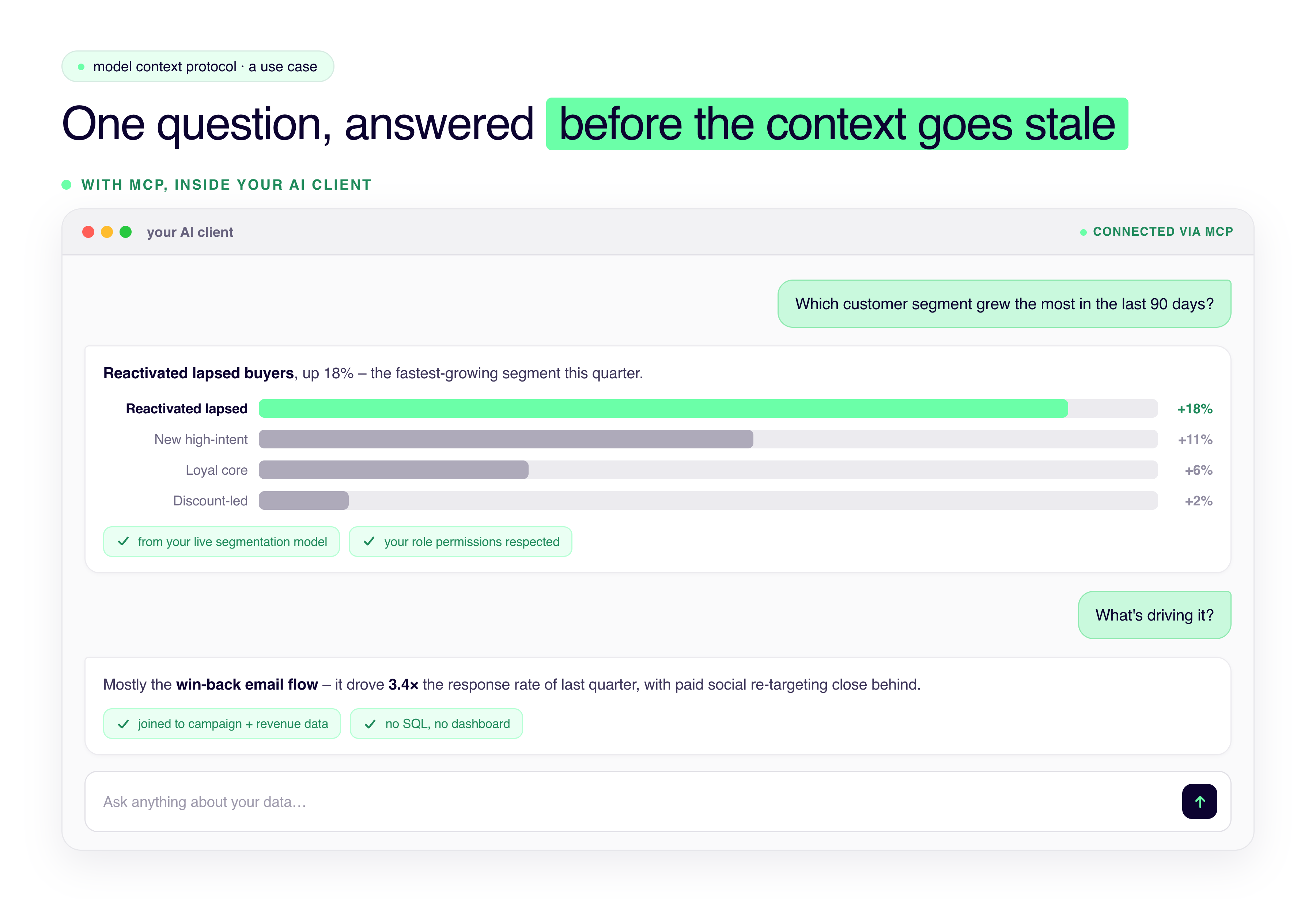
Analytics model outputs. If your platform runs predictive models (like the KAI Analytics Suite - customer segmentation, demand forecasting, media mix, attribution and more!) you can query those outputs through natural language conversation. "Which customer segment has grown the most in the last 90 days?" stops being a report you have to find.
Documentation. Ask how the platform works, get answers grounded in actual product documentation.
On the write side
Reading data is the obvious starting point for MCP, but writing is where things get more interesting.
When an AI client connected via MCP can generate SQL and write it to a sandbox for review, the steps compress: describe what you need -> review a diff -> approve. Nothing goes live without your review, and write access respects whatever role permissions already exist in the platform.
It doesn't replace judgment. It removes the mechanical steps that usually surround it: opening an editor, writing from scratch, testing, saving, finding where you were. For data teams running a lot of transforms, that adds up faster than you'd expect.
What about security?
Connecting an AI client to your data is the point where most teams pause, and rightly. A pipeline into your platform isn't one-way traffic, and set up badly, it's also a way for data to flow back out. There are three main risks that people consider when thinking about implmenting MCP.
Does sensitive data go into the model? By default, no. When an AI client previews a table through the Kleene.ai MCP, it gets a synthetic sample. Anything sensitive, personal details or card numbers, is stripped out before the model sees it, so the AI reads the shape of the data and how columns relate rather than real customer records. Raw previews are available, but off unless you deliberately enable them.
Can it change production without you knowing? No. Ask for a SQL change and the MCP drafts it, shows you a diff, and stops. Nothing is committed until you approve it into the editor or push it to a sandbox. The model can draft a transform; it can't push a live one on its own.
Are existing permissions respected? Yes. Write access through the MCP follows the role permissions already set in the platform. If a user can't edit a transform in Kleene, they can't through their AI client either. It's the same key card for the same building: any door you can't open, neither can the model.
In short, the model only ever sees a synthetic version of your data (by default), the user signs off on any changes, and its all stays bound by the same permissions you've already setup.
Kleene.ai is an AI data deployment platform covering the full data stack from ELT to predictive analytics in one place. KAI Assistant (Kleene's native AI, built on Google Vertex AI and the latest Gemini models) has been doing what MCP enables since it launched earlier this year: generating SQL, searching transforms, debugging pipelines, querying documentation, writing proposed changes to sandbox for review.
The Kleene.ai MCP integration gives that same capability to Claude, ChatGPT, Cursor, and any MCP-compatible client.
What's available today covers KAI Assistant Phase 1: transform search and generation, SQL optimization, log search, schema and table browsing, documentation answers, and sandbox writes for users with the right permissions.
Phase 3 of the roadmap goes further. Kleene's KAI Analytics models (MMM, customer segmentation, demand forecasting, digital attribution, creative diagnostics, price elasticity) will be queryable directly through conversation, with scenario simulations and grounded answers built on your own data.
If you're already using Kleene.ai, setup only takes a couple of minutes. Connect your account through your AI client of choice and start with something familiar: pull the SQL on a transform you already know, or check when a pipeline last ran. It usually becomes clear pretty quickly where this fits.
Evaluating data platforms more broadly? The 10 Best AI Data Platforms in 2026 is a good starting point. Ifyou're already running an full stack (Fivetran + dbt + warehouse + BI tool + a separate AI layer) and starting to feel the weight of it – we're probably worth a conversation.


%201.svg)


%201.svg)
