Intelligence for Data Transforms: How KAI Assistant Helps Data Teams Build Faster and More Accurately
April 14, 2026
— min read
Why having an AI that understands your specific data model changes what's possible for data engineers and analysts working inside Kleene.ai.
TLDR
Writing and maintaining SQL transforms eats more engineering time than most teams expect. KAI Assistant helps: generating transforms against your actual warehouse schema, explaining what existing transforms do, and giving junior engineers a way to work independently without escalating every question. The difference from generic AI coding tools is that KAI knows your data model. That's what makes the output actually usable.
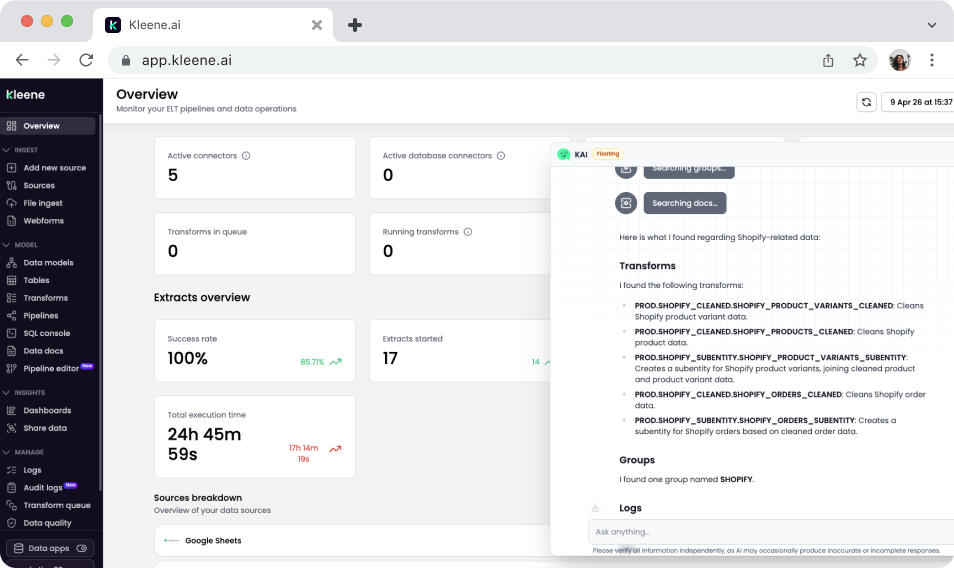
KAI Assistant checking transforms from the overview page
Where the time actually goes
Ask a data engineer what they spend most of their time on. It's rarely building new things. It's figuring out what a transform written six months ago is doing. It's writing the same cleaning logic again because the new connector sends data in a slightly different format. It's answering questions from junior team members who aren't sure if their approach is right for the schema.
None of that is a process failure. It's just how data modeling works. The context is specific, the work is repetitive, and the knowledge of how everything fits together tends to sit with a handful of people rather than being available to the whole team.
KAI Assistant is built to address that directly inside Kleene.ai.
SQL generation that knows your schema
Most AI coding tools will help you write SQL. They're useful. But they don't know what your tables are called, what columns exist, or what your data model requires. So the output is generic, and you spend time adapting it before it's actually usable.
KAI works from your live warehouse schema. With schema access enabled in App Settings, it can see your table structures, column names, and existing transform groups. When you ask it to generate a transform calculating revenue by customer segment using your orders and customer tables, it knows what those tables look like. The starting point it produces fits your environment rather than a hypothetical one.
For most teams, that's where the real time saving is. Not in writing SQL faster in the abstract — in not having to manually bridge the gap between a generic code suggestion and your specific data model.
Understanding transforms that already exist
A warehouse with a few months of active development can have hundreds of transforms across multiple groups, with dependencies running between them. If you didn't build them, understanding what a specific transform does and what would break if you changed it means either finding the person who did, or spending a lot of time reading through SQL files.
KAI makes that faster. You can ask which transform group handles a particular table, ask it to explain what a specific transform is doing, or search for transforms by name before making a change. Answers come from your actual data model, not generic documentation.
For new team members this matters a lot. Onboarding onto a complex pipeline without context is slow and stressful. Having something that can explain the architecture in plain English changes that experience significantly.
Junior engineers working more independently
Knowledge in most data teams is unevenly distributed. Senior engineers know the model well enough to move quickly and debug confidently. Junior engineers and analysts spend more time being unsure: whether a join approach is right for this schema, whether an error is in their SQL or upstream, whether a transform they need already exists somewhere.
KAI gives them a way to answer those questions without escalating every time. They can check whether their approach is correct, get an explanation of an existing transform before touching it, and get a starting point for new SQL to review and refine. Senior engineers stop being the bottleneck for questions that don't actually need their judgment.
In practice
A data analyst needs to build a reporting transform joining order data with marketing attribution data to calculate revenue by acquisition channel. With KAI, they describe what they need and get SQL that already references their actual table structures. They refine the business logic and deploy. Work that would have meant half a day of writing from scratch and iterating on column names takes a fraction of that.
A data engineer is about to refactor a transform group that hasn't been touched in eight months. Before changing anything, they ask KAI to explain what the affected transforms do and find anything downstream that depends on them. They understand the risk surface before touching a line. What would have meant an hour of tracing dependencies through SQL files takes minutes.
Same shift in both cases: the transform layer stops being something that only a few people can work in confidently.



%201.svg)
